
MediBang Paint:Draw Art, Comic
Contains adsIn-app purchases

star
302K reviews

Teen
info
10M+
Downloads


About this app
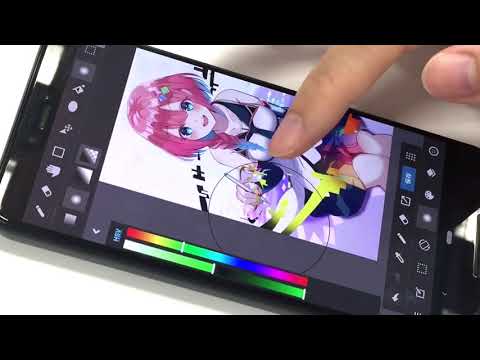
MediBang Paint is an art app for sketching, painting, drawing, and coloring using pencil and pen tools.
Designed for artists of all skill levels, it supports creating digital art, sketches, comics, and illustrations with ease. Whether you’re starting your first art book or refining your next dibujo, MediBang Paint offers powerful features for every creator.
With over 180 brushes included, from pencil and pen to airbrush and watercolor, it makes sketching and painting intuitive and smooth. Artists who subscribe can access 700+ additional brushes and create their own custom sets for a fully personalized workflow.
This art app is perfect for creating digital drawings, sketch-based concepts, and detailed illustrations. It supports PSD and CMYK formats for professional publishing, making it ideal for art books and comic production. Optimized for mobile and tablet, MediBang Paint ensures a smooth and responsive drawing experience.
Comic and manga creators benefit from built-in comic paneling tools, screen tones, speech bubble options, and over 60 fonts. From early pencil sketches to polished comic pages, everything can be done within the app.
Work across devices with cloud sync and collaborate on the same canvas with friends or team members. Share your timelapse recordings and drawing process with the creative community on social platforms.
Main Features:
・180+ brushes: including pencil, pen, paint, and more
・700+ additional brushes with subscription plans
・Comic panel and screen tone tools for manga and comic artists
・Supports sketching, drawing, and coloring workflows
・Compatible with PSD and CMYK files
・Cloud sync for seamless use across devices
・Collaborative drawing features for group projects
・Timelapse recording for showcasing your process
・Access tutorials, templates, and resources via MediBang Library
Whether you’re working on a new sketch, experimenting with a painting, or finishing a comic, MediBang Paint is a trusted art app for all styles and workflows. Enjoy a professional drawing experience with a lightweight and efficient design. Ideal for digital artists seeking a powerful alternative to Procreate or Clip Studio.
Start your next creation today—draw, color, and sketch with MediBang Paint.
Designed for artists of all skill levels, it supports creating digital art, sketches, comics, and illustrations with ease. Whether you’re starting your first art book or refining your next dibujo, MediBang Paint offers powerful features for every creator.
With over 180 brushes included, from pencil and pen to airbrush and watercolor, it makes sketching and painting intuitive and smooth. Artists who subscribe can access 700+ additional brushes and create their own custom sets for a fully personalized workflow.
This art app is perfect for creating digital drawings, sketch-based concepts, and detailed illustrations. It supports PSD and CMYK formats for professional publishing, making it ideal for art books and comic production. Optimized for mobile and tablet, MediBang Paint ensures a smooth and responsive drawing experience.
Comic and manga creators benefit from built-in comic paneling tools, screen tones, speech bubble options, and over 60 fonts. From early pencil sketches to polished comic pages, everything can be done within the app.
Work across devices with cloud sync and collaborate on the same canvas with friends or team members. Share your timelapse recordings and drawing process with the creative community on social platforms.
Main Features:
・180+ brushes: including pencil, pen, paint, and more
・700+ additional brushes with subscription plans
・Comic panel and screen tone tools for manga and comic artists
・Supports sketching, drawing, and coloring workflows
・Compatible with PSD and CMYK files
・Cloud sync for seamless use across devices
・Collaborative drawing features for group projects
・Timelapse recording for showcasing your process
・Access tutorials, templates, and resources via MediBang Library
Whether you’re working on a new sketch, experimenting with a painting, or finishing a comic, MediBang Paint is a trusted art app for all styles and workflows. Enjoy a professional drawing experience with a lightweight and efficient design. Ideal for digital artists seeking a powerful alternative to Procreate or Clip Studio.
Start your next creation today—draw, color, and sketch with MediBang Paint.
Sketch, draw, and paint with pencil and pen. A powerful art app for all creators
Updated on
Safety starts with understanding how developers collect and share your data. Data privacy and security practices may vary based on your use, region, and age. The developer provided this information and may update it over time.


Ratings and reviews
239K reviews

Ball of goo
- Flag inappropriate
- Show review history
June 13, 2026
Crashes frequently, has a deadzone for some reason(tested with other drawing programs and the problem was not present for others, so it's not the device.) Update: To add insult to injury, many of the classic brushes, particularly the ones I used the most (most pencil types, sumi types and basic watercolour types), are now membership locked. I have officially switched to infinite painter, Krita and drawpile. I have 0 respect for membership payment models.
6 people found this review helpful

J H
- Flag inappropriate
September 10, 2024
This app was a fairly decent free/low cost of entry app for drawing. WAS. The ads used to be tolerable, but I opened it after being unused for a while, and see they've decided to put banner ads in your drawing space. Not only does this make the app incredible laggy to draw with, but as a mobile app, severely decreases the already limited screen real estate on mobile devices like tablets. Absolutely silly choice, but it gave me the push I needed to buy an app that works across all my devices.
8 people found this review helpful

nunya beusness
- Flag inappropriate
September 25, 2023
it has become almost unusable. there are double ads over the canvas when you open the file, ads everytime you save. sometimes, the pen will suddenly get pixelated and you have to completely exit the tab to fix it. the app crashes almost every hour, with a "saving backup" message, but it's rare that there is ever actually a backup (this has always been an issue). it gets slow very easily, and this has happened since i started using the app, 2018. i loved this app. but i'm almost ready to quit.
3 people found this review helpful
What’s new
Updated the design of part of the top page.
Made the Premium introduction page easier to understand.
Made the Premium introduction page easier to understand.
App support
About the developer
MEDIBANG INC.
medibang_support@medibang.com
1-10-5, DOGENZAKA
SHIBUYA PLACE 2F.
SHIBUYA-KU, 東京都 150-0043
Japan
+81 80-4925-4525


